Ever imagined towering over Tokyo like a gentle giant? I recently experimented with Nano Banana Pro, an AI tool that lets anyone transform into a colossal figure amidst Tokyo's futuristic skyline. It was surreal and surprisingly easy.
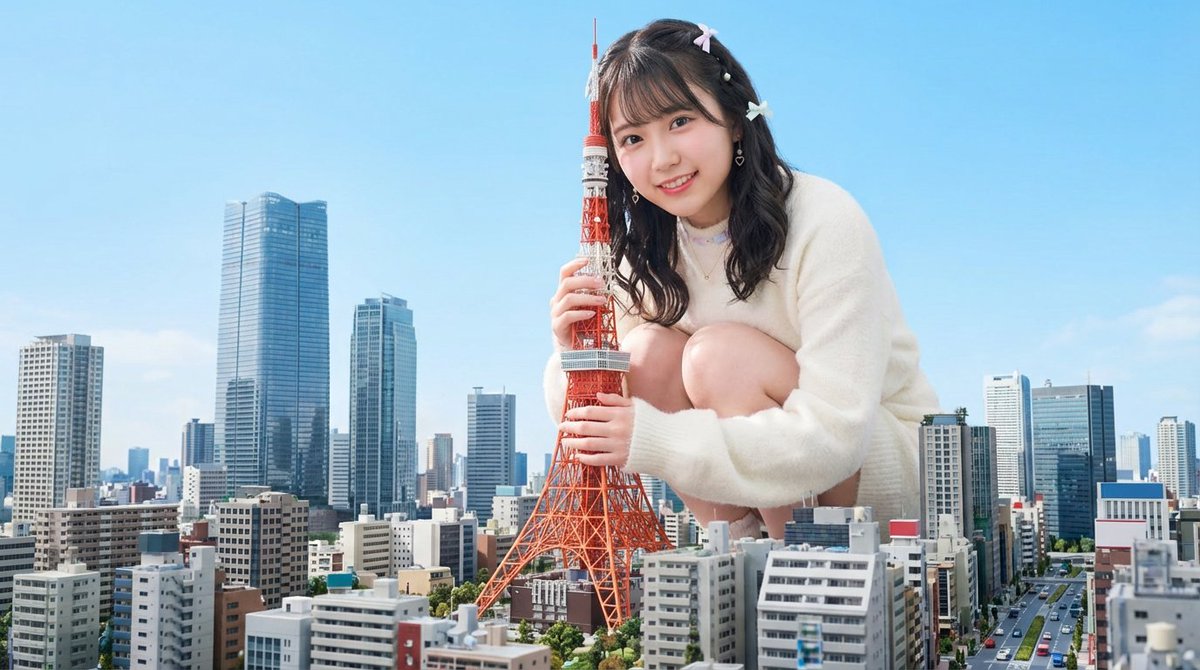
The prompt I used asked for a person enlarged to giant size, crouching above Tokyo’s modern urban landscape, softly embracing Tokyo Tower. The scene called for bright daylight, natural soft lighting, and a blend of realism and fantasy that made the image pop with vivid colors and sharp focus.
When I saw the final image, it felt like stepping into a dream where I could look directly at the camera, the sprawling city detailed beneath me. The balance between hyper-realistic buildings and a fantasy giant created a captivating contrast that felt alive yet magical.
Playing with this AI prompt taught me the value of precise visual descriptions. Adjusting the lighting to natural daylight and emphasizing soft shadows made the giant figure feel part of the scene, not pasted on. Small tweaks to the city’s detail level helped highlight the Tokyo Tower, the star of the composition.
For creators curious about similar projects, I recommend trying out AI image generators that support rich text to image prompts. The key is balancing realism and fantasy without overloading the scene. Avoid prompt mistakes like vague lighting or unclear focal points—these can flatten the image’s impact.
Nano Banana Pro unlocked a fun way to reimagine scale and urban space through AI art creation. If you try becoming a giant hugging a landmark, I’d love to see your photos—share your results and prompt tweaks!
You can find the full prompt here: ✨Prompt✨
Tips for Using This Prompt
- Focus on natural, soft daylight to maintain realism.
- Describe detailed building textures for immersive cityscapes.
- Balance fantasy elements with sharp, vivid colors for impact.
- Keep the giant figure’s pose gentle to add emotional warmth.
Discover more about text to image tools and how to fine-tune your AI prompt for stunning results.