Testing Nano Banana Pro for UV Unwrapping
As a 3D artist constantly seeking efficient tools, I recently experimented with Nano Banana Pro to unwrap the UVs of a detailed 3D model. The prompt I used asked for about one-third of the image to show a reference view of the model, while the rest displayed the UV layout for the head, body, and limbs—all flattened into a single 0–1 UV space.
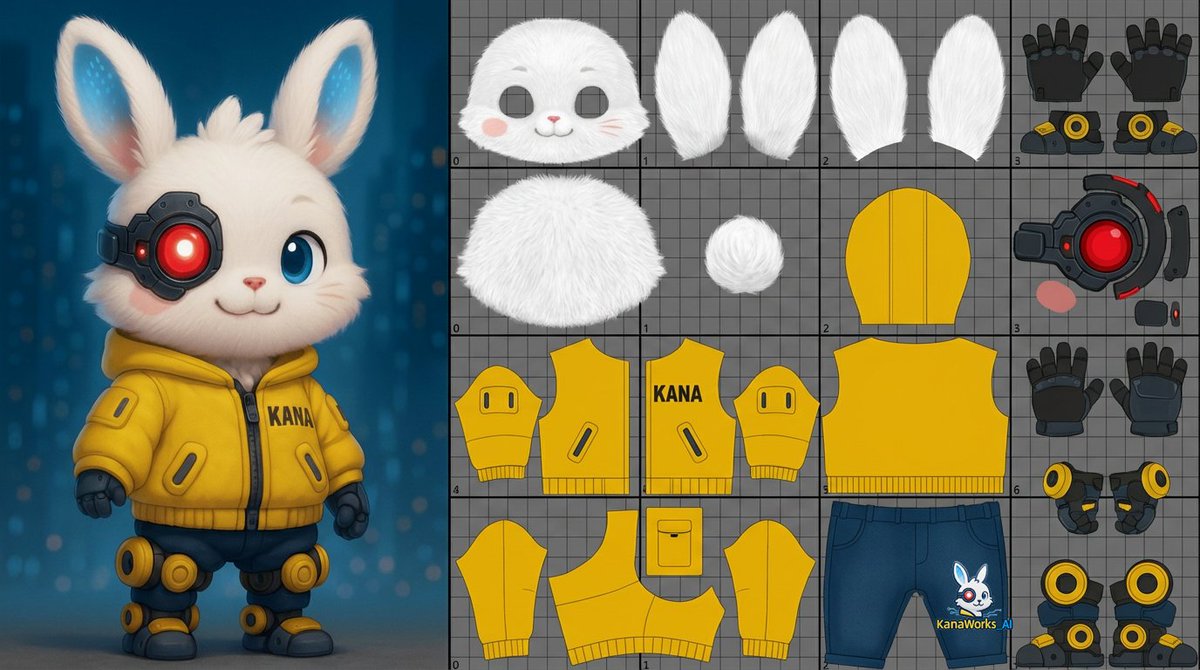
This approach is essential for clean texturing and game-ready assets, so I was eager to see how the AI would perform.
Results and Visual Details
The output was visually impressive in terms of layout clarity. The UV islands for the head, body, and limbs were separated and organized fairly well. Seeing the 3D model alongside the UV map helped me quickly assess the unwrapping quality. However, despite the neat presentation, the UV seams and stretching still needed refinement for production standards, especially in tight game pipelines.
What stood out was how Nano Banana Pro managed to flatten the complex surfaces into a single 0–1 UV space without overlapping, which is a challenging task. But some areas, like the limb UVs, showed distortion that could affect texture fidelity.
Practical Insights and Next Steps
Using this AI for UV unwrapping gave me a fresh perspective on how automation can speed up the initial stages of texturing workflows. Still, it’s clear that manual adjustments remain crucial for game-ready assets. I’m particularly looking forward to future updates that might improve seam placement and reduce distortion.
For creators curious about integrating AI into their 3D pipelines, a few tips emerged:
- Always review and tweak AI-generated UVs before finalizing.
- Use clear, detailed prompts specifying what parts need unwrapping and the desired UV space.
- Combine AI output with traditional tools for best results.
Overall, Nano Banana Pro offers a promising start for AI-driven UV unwrapping, but it’s not quite ready to replace hands-on expertise just yet.
Explore More About AI and Image Generation
If you want to dive deeper into image generation and how to use AI prompts effectively, check out resources on AI image generator tools. They offer great insights on crafting prompts and avoiding common mistakes when working with text to image technology.
You can find the full prompt here: ✨Prompt✨