Working with portraits and phone screen content can be tricky when you want the final image to feel natural yet visually dynamic. Recently, I experimented with Nano Banana Pro, an AI-driven tool designed to merge a person’s photo with phone screen visuals in a seamless, 2×2 grid layout. The experience was surprisingly smooth and gave me fresh ideas for presenting phone content in lifestyle shots.
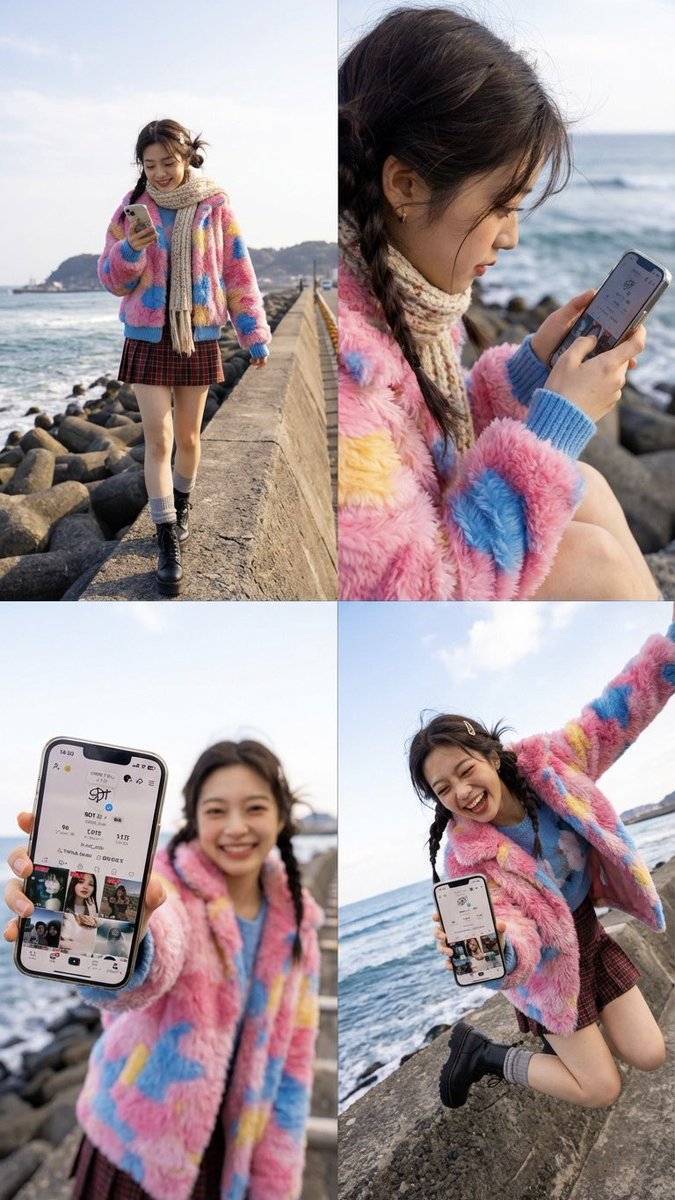
The core magic lies in how the AI keeps the person’s identity consistent—same face, hairstyle, outfit, and environment style—while inserting the phone screen content realistically. This meant no awkward distortions or forced angles, which usually kill the vibe of a candid shot. The phone is shown in natural holding styles like one-handed or tilted, with the screen always clearly visible but never pushed directly toward the camera.
What I loved most was the variety of poses generated across the four panels: a soft intro with a side-by-side walking pose, a close natural glance at the phone, an arm-extended forward shot with wide-angle perspective making the hand and phone pop, and a lively mid-air jump frame that adds energy to the set. The expressive hands and bright, natural smiles made each panel feel authentic and engaging.
The lighting and environment style from the original photo were preserved beautifully, so the edits didn’t feel like separate layers but a coherent story. This made it easy to use these images for social media or promotional content where you want the phone’s screen content to shine without losing the human element.
If you’re a creator looking to enhance your phone content visuals with natural motion and consistent identity, Nano Banana Pro is worth exploring. It’s especially useful when you want a grid layout that tells a story through varied but related shots.
You can find the full prompt here: ✨Prompt✨
For more on AI-powered creative tools, check out these resources: AI image generator, text to image, and AI art creator.