Why Consistency in AI Character Grids Is a Game-Changer
When I first tried to generate AI character portraits, single images looked stunning. But the moment I moved to a multi-panel grid—like a 15-panel casting card—the character’s features would wildly drift. It felt like chasing a ghost: the same face, but somehow different in every panel. This inconsistency made the grids unusable for professional portfolios or model sheets.


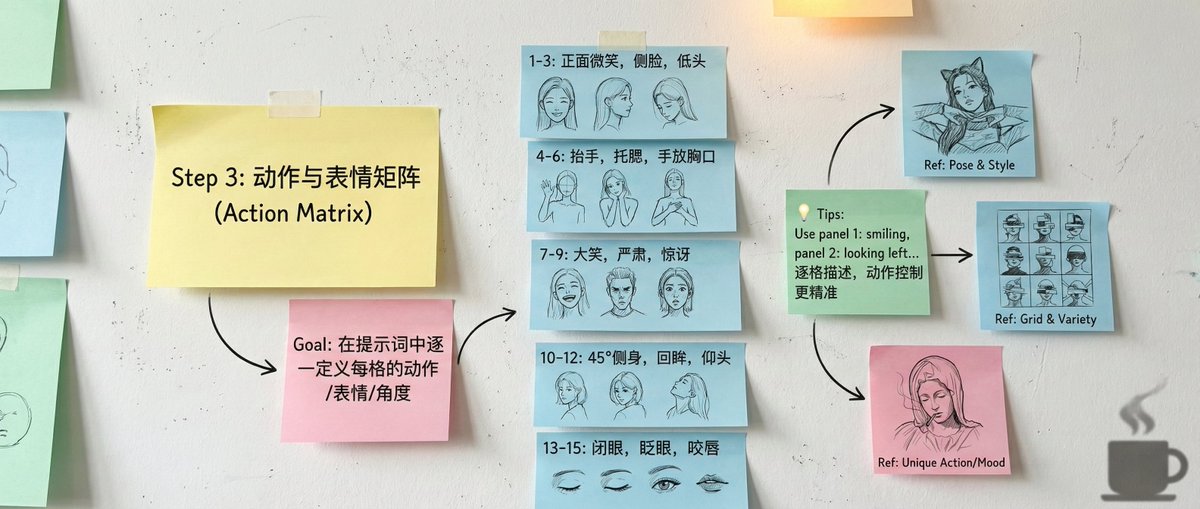
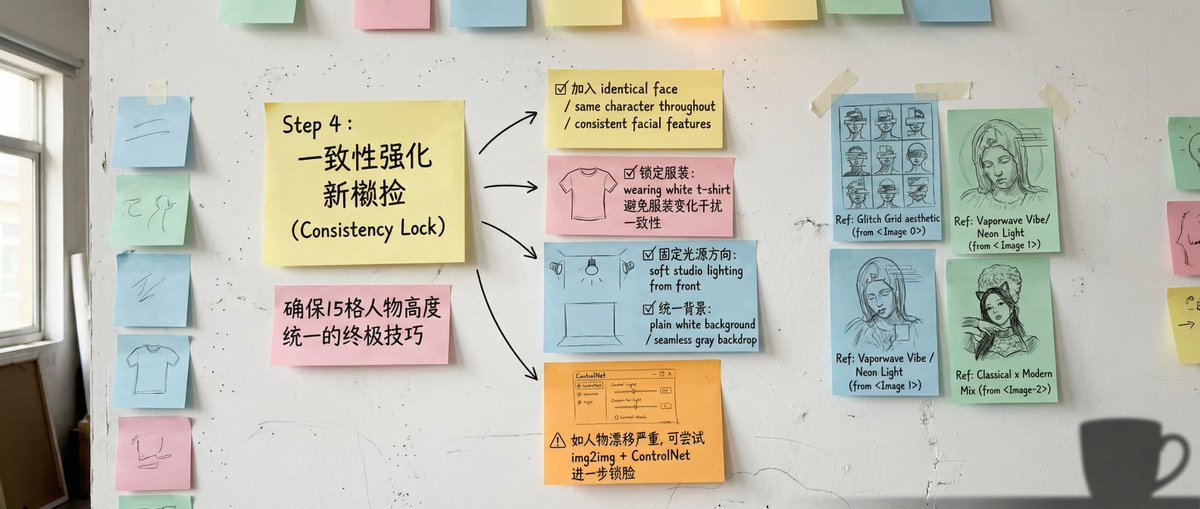
You can find the full prompt here: ✨Prompt✨
Breaking Down the Workflow That Changed Everything
After loads of trial and error, I distilled a workflow that reliably produces 15-panel grids with near-perfect character consistency. Here’s the essence:
- Character Seed: Forget vague adjectives. I pixel-level dissect facial features — oval face, angular jawline, warm skin tone with light freckles, almond eyes, sharp nose. Using large language models like ChatGPT to reverse-engineer precise descriptors helped standardize these details.
- Grid Prompt: To prevent AI from improvising too much, I locked down the prompt with tokens like "15-panel grid photo sheet, same character, consistent appearance, uniform lighting, plain background". This structured command keeps the composition and lighting coherent across panels.
- Action Matrix: I created controlled layers of expression and pose: panels 1-3 are neutral, 4-6 show angles, 7-9 carry high emotion, and 10-15 handle hand gestures or subtle microexpressions. This layering avoids repetition and expression collapse.
- Consistency Lock (The White T-Shirt Hack): When features still drifted, I added a simple white t-shirt across all panels. This minimal clothing reduces distractions in the model’s attention, forcing the AI to focus on face features for identity consistency.
Visual Effects That Add Flair Without Breaking Consistency
My JSON template includes unique effects per panel — from horizontal RGB glitch slices to floating neon triangles and VHS-style noise overlays. Importantly, these effects sit on top of the locked character identity, giving each panel personality without sacrificing coherence.
Practical Tips and Tools
Using plugins like InstantID or IP-Adapter to upload a reference face lets the AI replicate it with 98%+ consistency. This dramatically reduces drift and makes the 15-panel output ready to use as professional casting or model cards.
For those who love structured workflows, the JSON configuration I developed is a fantastic starting point. It’s easy to tweak parameters and integrate into automation scripts.
Final Thoughts
Summing up: lock the face features, build a grid framework, assign expression roles, and add a consistency lock with simple clothing. Follow these four steps, and your 15-panel AI character grids will finally feel polished and reliable.
For fellow creators struggling with multi-image consistency, I hope this approach saves you the headache it saved me. If you want to dive deeper, check out the AI image generator and AI art creator resources for more tips on image generation and prompt crafting.