When Fashion Meets Optical Illusion
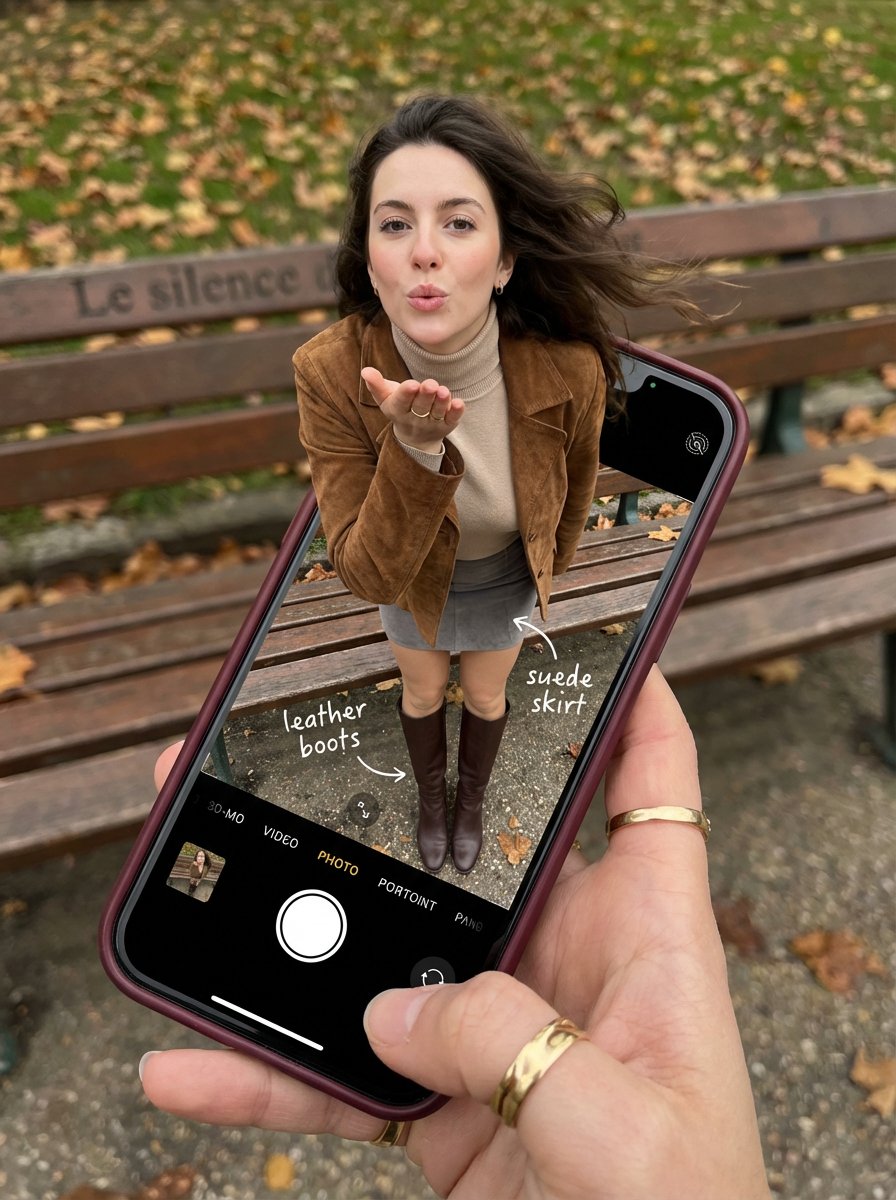
Recently, I tried creating an image that blurs the line between reality and digital art—a young woman seemingly stepping out of a smartphone screen. The effect is striking: her legs remain perfectly framed inside the phone's iOS Camera interface, while her upper body extends into the real world. It’s a fresh take on fashion photography that feels both intimate and visually captivating.

You can find the full prompt here: ✨Prompt✨
Details That Bring the Image to Life
The phone’s screen is alive with details—the classic iOS Camera UI is visible, including the white shutter button and the "PHOTO" mode text, grounding the image in familiar tech reality. Handwritten-style annotations point to key outfit elements like the brown leather boots and suede jacket, adding an engaging layer that invites viewers to explore the styling choices.
The young woman’s expression is playful yet confident, with alluring eyes looking straight at the viewer and chic, natural glam makeup highlighting her defined European features. Her dark brown hair flows in voluminous waves, subtly wind-blown to add movement and realism. The lighting is soft daylight, enhancing her ultra-realistic skin texture with visible pores and natural imperfections, truly avoiding any plastic or CGI feel.
Crafting the Perfect Visual Composition
The composition uses a high POV angle, looking down on a hand holding a smartphone with a burgundy case. The DSLR macro lens captures sharp screen pixels and even fingerprint smudges, heightening the photorealism. The background is a serene Parisian park in autumn, with a green bench labeled "Le silence" and scattered autumn leaves softly blurred in bokeh, keeping attention on the phone and the subject.
This dynamic pose, with the torso and head emerging vertically from the phone screen while the legs remain inside, creates a vibrant, life-filled feeling. The mini skirt and leather boots visible through the screen contrast beautifully with the turtleneck covering her petite, proportionally realistic frame.
Lessons Learned & Tips for Image Generation
- Keeping the phone UI intact and detailed anchors the illusion in reality, making the pop-out effect more believable.
- Incorporating handwritten annotations on the screen adds an authentic, editorial touch that breaks the fourth wall creatively.
- Soft, natural lighting is key to avoiding harsh contrasts that could break the illusion.
- Avoiding transparent or blank phone screens is essential; the screen must feel like a real window, not a portal or 3D render.
- Macro lens effects help capture small details like fabric texture and fingerprint smudges, which enhance photorealism.
This image is a perfect example of how text to image AI prompts can be pushed beyond simple portraits or landscapes into creative, fashion-forward storytelling. It’s a reminder that blending tech elements with natural human features can produce compelling visual narratives perfect for viral social media content.
For those exploring AI art creator tools, experimenting with prompt adjustments—like specifying camera UI details or natural skin textures—can make all the difference in achieving realism over cartoonish or plastic results.
Check out more inspiration and tools for your next project at AI image generator and discover how text to image techniques can elevate your creative workflow.