Recently, I dove into a fascinating AI image prompt called Shadow & Glitch Effect that completely transformed how I approach layering visuals. The concept is simple yet powerful: keep your main subject crisp and natural, then play around with colored ghost shadows behind it, layered with analog-style noise and glitch artifacts. The result? A dynamic contrast that grabs attention instantly.
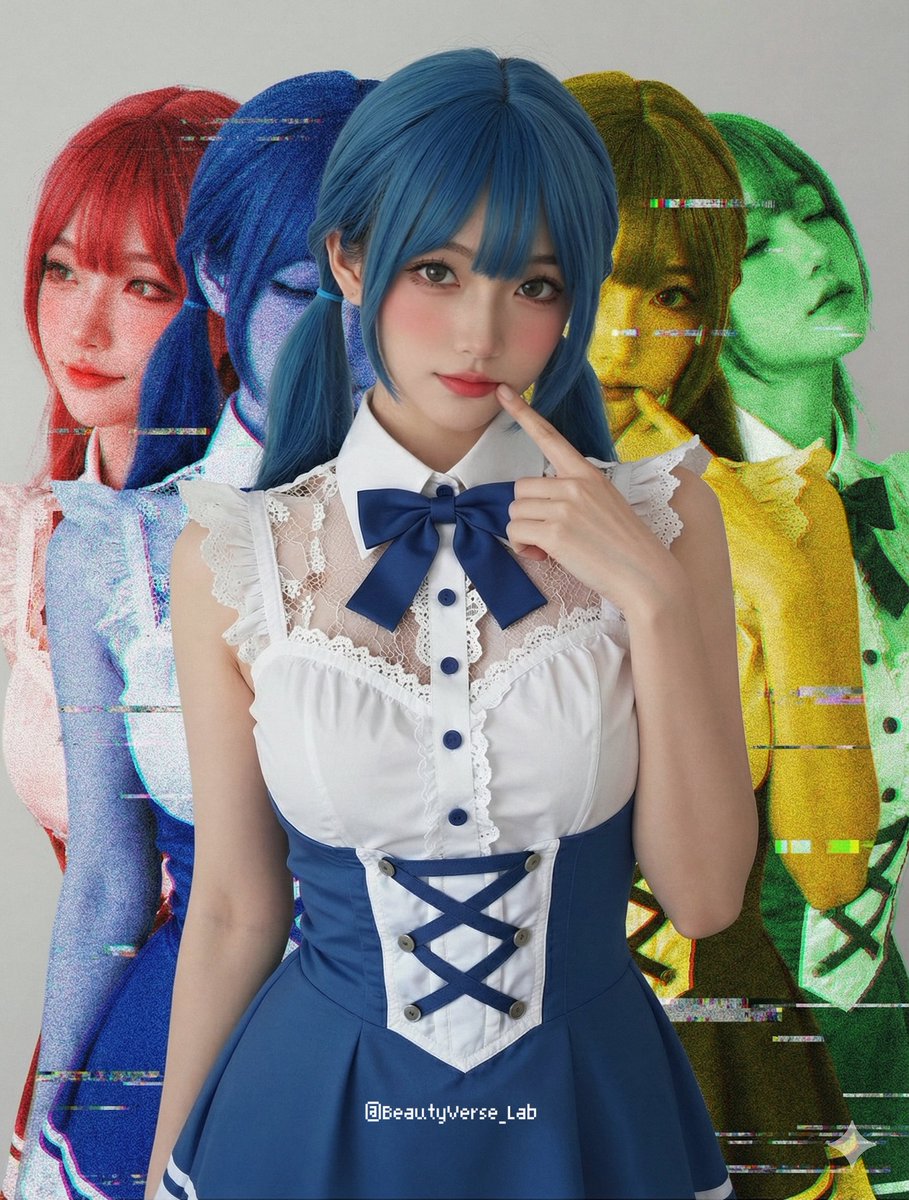

What drew me to this prompt was its modular design—it's divided into clear sections, making it easy to tweak shadows, colors, and glitch intensity to fit my style. The main subject stays sharp and filter-free in the center, which I found crucial for maintaining focus, while the four ghost duplicates behind add a surreal, almost retro-futuristic vibe.
Breaking Down the Visuals
The shadows are offset duplicates colored red and blue on the left, and yellow and green on the right. This setup creates a captivating prism-like effect that feels both nostalgic and modern. Adding VHS scan lines and analog noise exclusively to these duplicates gave the background that gritty, unstable feel reminiscent of old tapes or early digital glitches. It made the clean subject pop even more.
Playing with this prompt pushed me to explore different glitch intensities and color combinations. Sometimes dialing back the noise created a subtle aura, while cranking it up made the whole image feel like a bold, chaotic statement piece. This flexibility is what makes the prompt so fun and versatile.
What I Learned
- Keeping the main subject filter-free anchors the image and prevents visual overload.
- Separating glitch effects to duplicates lets you control chaos without losing clarity.
- Color choices for shadows dramatically affect mood and depth.
- Prompt sections make experimenting approachable even if you’re new to AI image generation.
If you’re curious about using text to image AI tools or want to experiment with glitch art, this method is a fantastic playground. It teaches how to balance clarity with distortion and how to use color and noise to elevate visuals.
You can find the full prompt here: ✨Prompt✨
For more inspiration, check out other creative ideas on AI image generator and explore how AI art creator tools can bring your concepts to life.