Recently, I dove into creating a stylized 3D cartoon character using an AI image generator, and the result was surprisingly charming. Starting with a simple upload of my photo on @grok, I crafted a prompt that brought a whimsical, Pixar-inspired character to life against a bold orange backdrop.
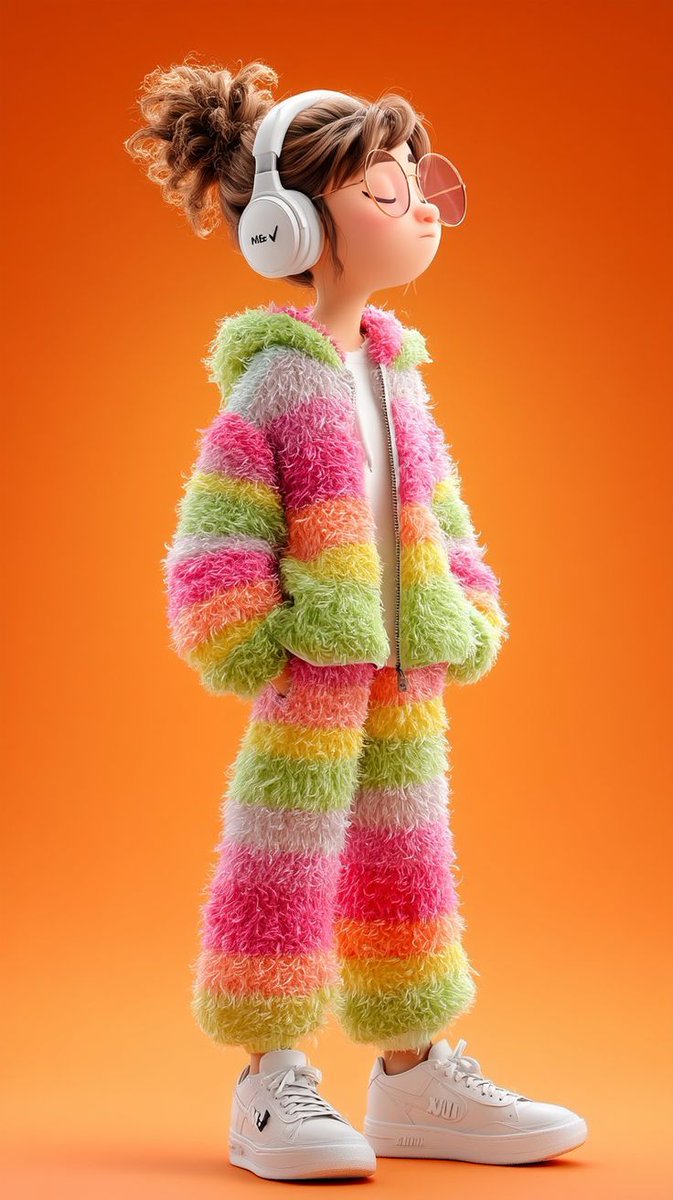
The character wears a fluffy rainbow-striped tracksuit, blending pastel pinks, greens, yellows, and oranges with an ultra-soft furry texture that almost invites you to touch it. The zip-up jacket and matching pants are detailed with smooth gradients and soft lighting, giving the outfit a cozy, tactile feel. I love how the oversized white headphones and transparent round glasses add personality, while the chunky white sneakers ground the look in modern streetwear vibes.
One of the most satisfying visual details is the character’s calm expression—with closed eyes and a rounded, cute face—paired with a messy bun hairstyle that feels effortless yet stylish. The Pixar-style proportions and cinematic studio render qualities, like shallow depth of field and ultra-clean composition, made the image pop in 8K quality, enhancing every detail from the soft fur texture to the subtle shadows.
This experience taught me a lot about prompt adjustments and how specifying textures, colors, and mood can drastically change the final visual outcome. For creators aiming to explore text to image transformations, I recommend experimenting with detailed descriptions of materials and lighting. Avoid vague prompts; instead, focus on what feeling or aesthetic you want to evoke to guide the AI effectively.
It’s also worth noting that ultra-clean compositions and soft lighting work wonders for character-focused images, especially when paired with pastel palettes and modern casual fashion. This approach helped me create a calm, inviting image that feels fresh and visually engaging.
You can find the full prompt here: ✨Prompt✨
Why This Matters for Visual Creators
Using AI art creators to transform photos into stylized 3D characters opens up new storytelling possibilities. Whether you’re designing avatars, marketing visuals, or personal art projects, understanding how to tailor your AI prompt to capture texture, mood, and style is key. This project reminded me how combining Pixar-like proportions and cinematic lighting can elevate character design beyond flat illustrations.
For anyone curious about image generation, tools like AI image generator platforms empower you to explore diverse aesthetics quickly. Adjusting your prompt based on the initial outputs lets you refine the look — from tweaking color vibrancy to enhancing softness or adding accessories like headphones and glasses.
Ultimately, this process isn’t just about creating pretty visuals; it’s about learning how to communicate ideas visually through AI. If you’re into modern, clean, and highly detailed character art, try incorporating specific style and texture cues to get the best results.