Capturing Emotion in a 3×3 Portrait Grid
One of the most fascinating things about portraits is how expressions can tell entire stories without a single word. Recently, I decided to experiment with an AI image generator to create a modern portrait grid featuring a single person expressing nine different moods and expressions. Using a clean and editorial style, I aimed for ultra-realistic images that maintained the same facial features and hairstyle while varying only the emotions and subtle styling.
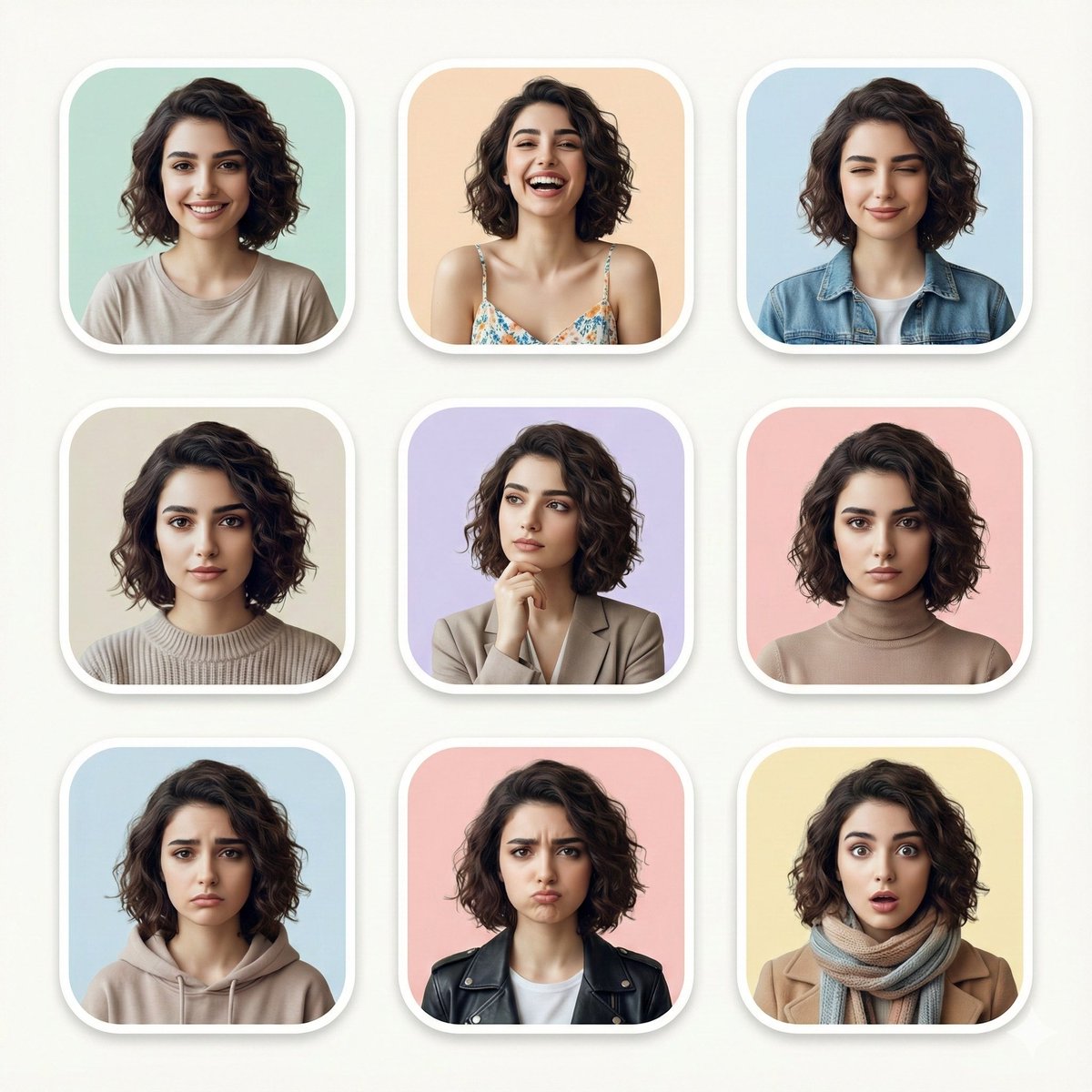
The prompt I used guided the AI to arrange these portraits in a neat 3×3 grid, each framed with rounded corners and placed on soft pastel backgrounds. The lighting mimicked soft studio setups, highlighting high-detail skin textures and creating a shallow depth of field that brought the face into sharp focus while gently blurring the background. The wardrobe was kept minimal and consistent to keep attention on the expressions.
Why This Prompt Worked So Well
What I loved about this AI prompt was how it balanced detail with subtlety. The AI maintained the exact same person’s features, making the grid feel cohesive and intentional. The variety of expressions—ranging from a natural smile to playful pouts, contemplative poses, and even surprised wide-eyed reactions—made each portrait stand out while contributing to the overall narrative of emotional complexity.
From a content creator’s perspective, this approach is incredibly useful for editorial projects, mood boards, or even branding visuals where showcasing different facets of personality is key.
Tips for Using Prompts Like This
- Keep your base reference photo clean and well-lit. This ensures the AI has enough detail to maintain realism across expressions.
- Specify consistent lighting and minimal wardrobe changes. This keeps the focus on facial expressions without distracting elements.
- Use a clear layout instruction. Asking for a 3×3 grid with rounded frames and pastel backgrounds helped create a polished, editorial feel.
- Check for subtle styling differences. Small changes like a hand on the chin or slight eye closure add emotional depth.
“Experimenting with AI for visual creation has opened up new ways to express complex emotions through simple portrait grids.”
You can find the full prompt here: ✨Prompt✨
For creators interested in exploring text to image generation further, tools like AI image generator and AI art creator offer great starting points. Adjusting your prompt carefully can make a huge difference in output quality and realism.
Whether you want to capture mood variations, create editorial content, or build visual identity, understanding how to use prompt adjustments effectively is key to mastering image generation.