Experimenting with Scene Variations Through AI
Recently, I dove into an exciting AI image generation project inspired by a contact sheet prompt originally crafted by @techhalla. The idea was to visualize the exact same subject from nine distinct camera setups — maintaining perfect likeness and environmental consistency. This approach felt fresh and challenging, pushing me to explore how AI can replicate real-world cinematic photography nuances.
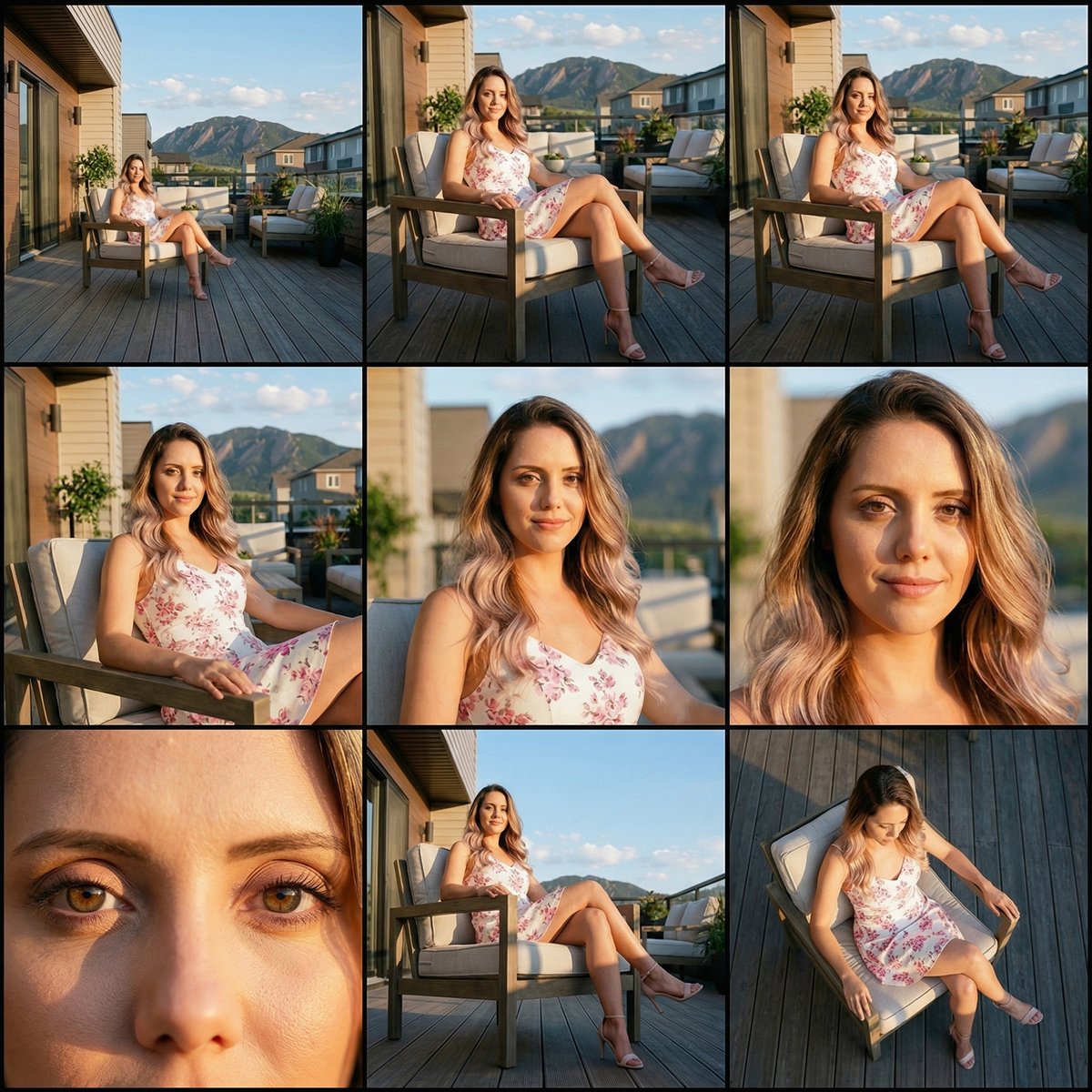
The technique involves creating a "Cinematic 3×3 Contact Sheet" that captures everything from wide establishing shots to intimate extreme close-ups, all while keeping lighting, textures, and colors flawlessly unified. The key is that only the camera angle, distance, and focal length shift, giving a rich storytelling grid that feels like flipping through professional storyboard frames.
You can find the full prompt here: ✨Prompt✨
Why This Matters for AI Image Generation
What really blew me away was the AI’s ability to preserve identical appearance, posture, and environmental elements across all nine frames. Each panel featured consistent lighting and color temperature, which is no small feat considering the varied viewpoints — from extreme long shots to low and high angles. The depth of field naturally adjusted, with crisp backgrounds in wide shots and beautiful bokeh in close-ups, mimicking real optical lens behavior.
Using Nano Banana Pro for this project allowed me to upload a reference image and precisely control the AI prompt to prevent any unwanted changes in subjects or environment. This control is crucial for creators who want to produce professional editorial photo-realism without the typical artifacts or painterly effects AI sometimes introduces.
Visual Storytelling and Practical Insights
Working through the nine frames felt like directing a mini film. The first row established context with wide environmental views, which grounded the subject in space. The second row zoomed in closer, revealing posture and subtle facial details, perfect for emotional storytelling. The final row was all about intimacy and perspective shifts — macro details and dramatic angles that add cinematic flair.
One practical tip I learned: when adjusting prompts for such variations, emphasize strict likeness and environmental consistency, while only allowing camera parameters to change. This prevents the AI from drifting into unwanted creativity that breaks immersion.
For anyone interested in text to image workflows, this method offers a powerful way to explore different visual moods and uses within a single cohesive project.
Where to Go From Here
If you want to experiment with similar cinematic grids, try using Nano Banana Pro or any advanced AI image generator that supports precise prompt control. Playing with camera distance and angles while locking down lighting and color creates stunning editorial visuals that stand out.
For more on how to use prompt adjustments effectively and avoid common prompt mistakes, check out resources on image generation and AI art creator best practices.