Creating a Plush, Cool Bunny in 3D
When I first saw the prompt for a full-body 3D render of a confident bunny character, I immediately wanted to capture the playful yet stylish vibe it suggested. The idea of combining soft, realistic dark-gray fur with a minimalist studio background was perfect for focusing on the character’s personality and details.
The bunny’s plush texture was the first challenge. Getting that soft, almost touchable feel in the fur required layering subtle shading and highlights to mimic the way light interacts with fabric and fibers. The long upright ears and tiny pink nose added a delicate contrast that made the character feel alive and approachable.
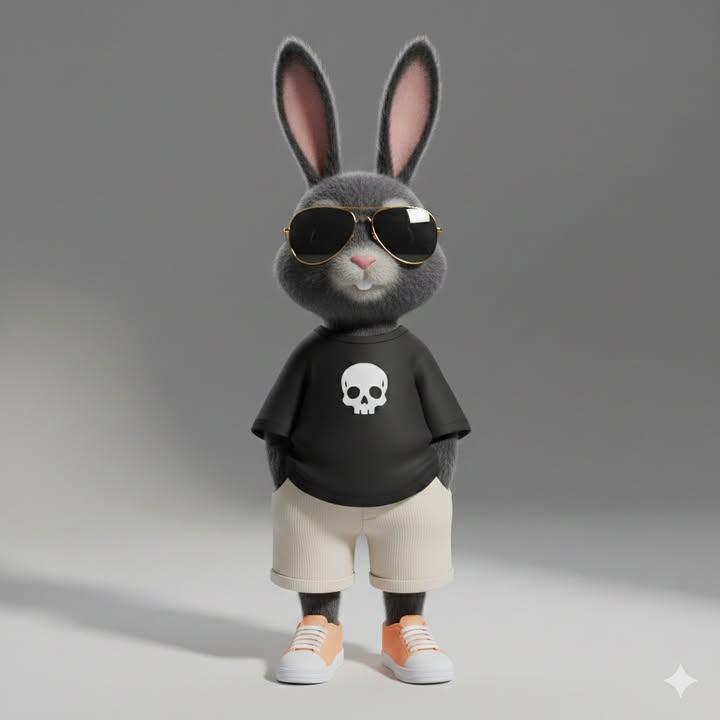
The street-style outfit was a fun detail that gave the bunny an edge. The loose black oversized T-shirt with a simple white skull icon felt modern and effortlessly cool, while the cream-colored shorts with ribbed fabric texture added depth without overpowering the design. I loved the light orange sneakers with white soles—those little pops of color made the whole look more dynamic.
One of my favorite touches was the black sunglasses with thin gold frames. They brought just enough attitude while keeping the character approachable and stylish. The relaxed pose, with hands casually tucked in pockets, really helped convey confidence and ease.
The studio setting was intentionally minimalist with a clean neutral gray background and soft diffused lighting. This helped the character stand out sharply while gentle shadows added dimension without distraction. The 9:16 vertical format suited the character’s full-body portrait perfectly, giving it a modern toy-figure aesthetic with Pixar-quality realism.
Working on this render taught me a lot about balancing ultra-detailed textures with smooth depth of field and cinematic lighting. It’s a great example of how well-crafted prompts can help push image generation tools to create visually rich, believable characters.
You can find the full prompt here: ✨Prompt✨
For anyone looking to explore similar projects, I highly recommend experimenting with AI image generator tools that support detailed prompt adjustments. Understanding how to tweak lighting, textures, and composition can elevate your 3D character renders from basic to captivating.
Check out more about text to image techniques and how to use prompt details effectively to create stunning visuals. If you want to dive deeper into the art of image generation, resources on AI art creator workflows can be invaluable.