Discovering New Depths with Nano Banana Pro on Gemini App
As someone who loves experimenting with AI image generation, my recent dive into using the Nano Banana Pro on the Gemini App brought an unexpected creative breakthrough. The prompt was simple yet evocative: a high-resolution bird’s-eye view photo taken with a LOMO Ic-a camera, featuring a ground carpeted with countless black-and-white billboard ads of fashion models. Atop these ads stands an incredibly beautiful Japanese film actress clad in a long black coat. The image concept was layered, moody, and visually striking — exactly the kind of challenge I wanted to tackle.
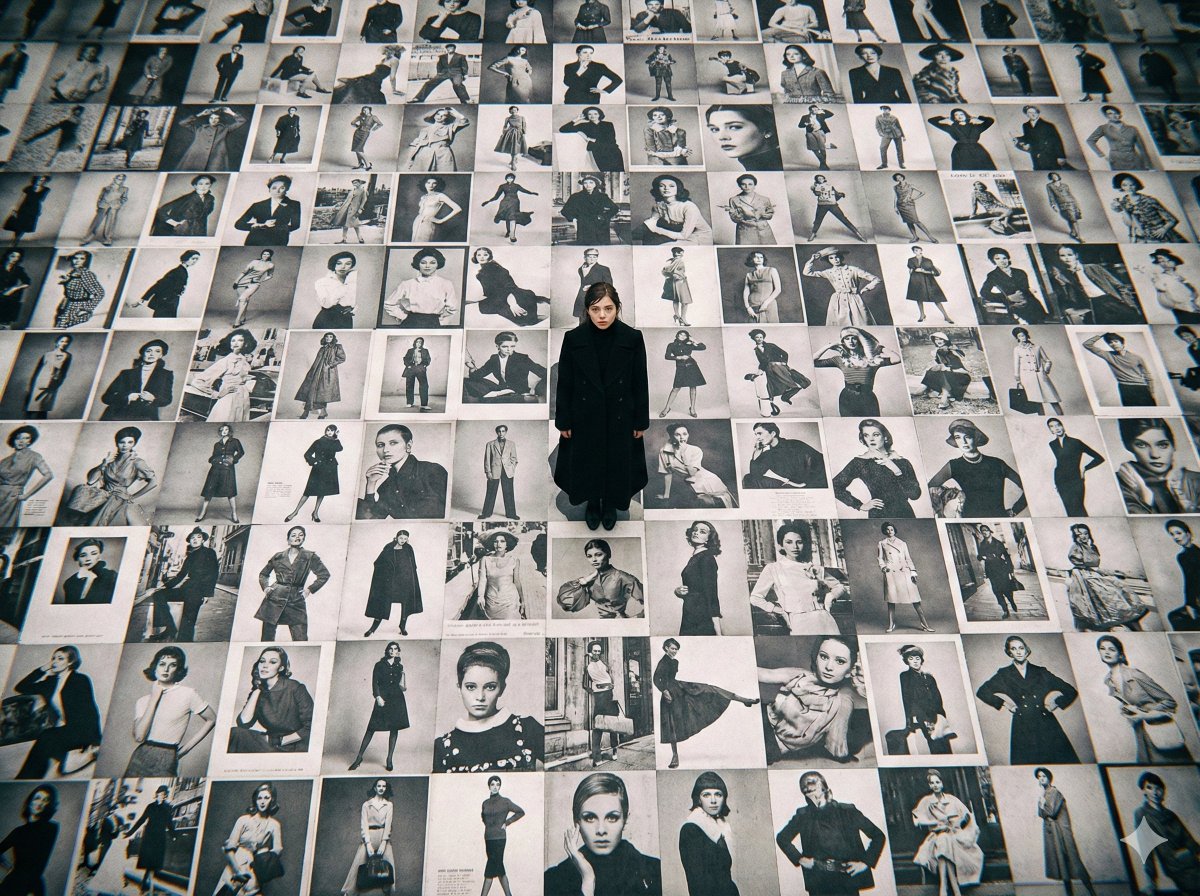
You can find the full prompt here: ✨Prompt✨
What struck me first was how the bird’s-eye perspective added a sense of scale and surrealism. The endless black-and-white billboards created an almost hypnotic pattern, while the actress, rendered in delicate detail, became a focal point of calm and elegance amid the visual chaos. The LOMO Ic-a style lent the image a nostalgic, filmic texture that contrasted beautifully with the modernity of the fashion ads.
Using the Gemini App’s Nano Banana Pro model, I could fine-tune the prompt to enhance the contrast between the monochrome ground and the actress’s black coat, making her stand out without losing subtlety. This balance was key — too much sharpness and the image felt artificial; too little, and the mood was lost.
What I Learned About Prompt Adjustments
One practical insight: specifying the camera type (LOMO Ic-a) helped guide the AI to replicate that vintage analog feel, which is something I hadn’t consciously considered before. Also, focusing on the mood through detailed visual descriptors ("countless black-and-white billboard advertisements" and "incredibly beautiful Japanese film actress") pushed the AI to generate a more cohesive scene.
However, I noticed that omitting details about lighting or facial expressions sometimes led to generic results. So, next time, I plan to add subtle cues about the actress’s pose or the time of day to imbue even more emotion into the scene.
Why This Matters for Visual Creators
For anyone working with text to image tools, combining specific camera references with vivid scene descriptions can unlock unique creative directions. This approach helped me break out of generic AI art and produce something that feels layered and intentional.
Exploring this prompt on the Gemini App also reinforced how important it is to experiment with prompt adjustments — subtle changes can dramatically affect the output’s mood and detail.
If you’re curious about expanding your AI art creator toolkit, trying out Nano Banana Pro on Gemini App with similar descriptive prompts is a great start. You can dive deeper into advanced image generation techniques on platforms like AI image generator or explore more on text to image workflows.