Why I Tried This Urban Streetwear Editorial Collage
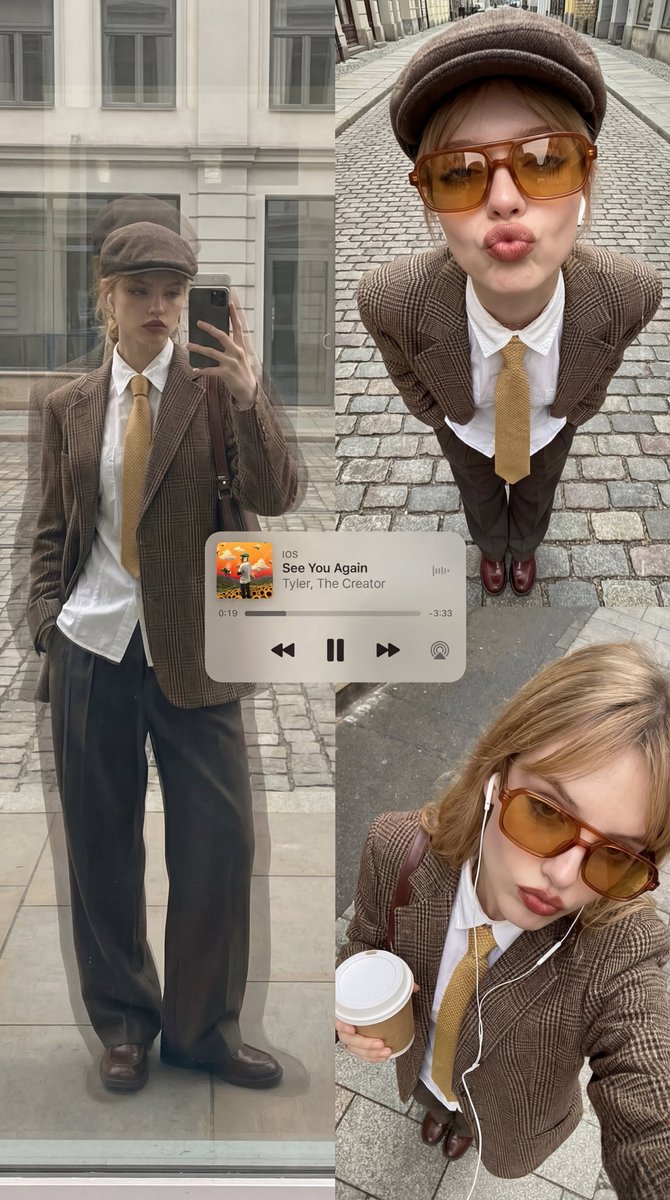
As someone who loves blending vintage vibes with modern aesthetics, I wanted to push my AI image generation skills toward creating an editorial poster–style collage that feels both nostalgic and fresh. The Gemini Nano Banana Pro prompt offered a unique setup: a multi-panel layout capturing streetwear with warm ambers and muted browns, all filtered through a retro analog-digital fusion mood. I was curious how layering textures like reflective glass and wool plaid could add depth and realism.
You can find the full prompt here: ✨Prompt✨
Visual Elements That Made This Pop
The core outfit was a brown plaid blazer paired with a crisp white shirt and a yellow tie, grounded by loose dark trousers. Accessories like an amber-tinted oversized rectangular sunglasses and a brown cap gave the subject personality, while wired earphones added subtle tech flair without breaking the retro mood.
The collage’s three-panel composition really helped tell a story. The top-left frame—a reflective window shot—used ghosting and architectural overlays to create a sense of urban depth. The distortion in this frame felt like looking through a warped cityscape mirror, which was a refreshing challenge for text-to-image generation.
On the top-right, the downward-angled ultra-wide portrait featured cobblestone streets radiating outward, emphasizing the streetwear vibe. The exaggerated pout and hands-in-pockets pose brought attitude, while lens distortion created an immersive effect that felt dynamic and alive.
The bottom-right panel was an intimate overhead selfie with soft overcast lighting, holding a drink. The faint digital grid and minimal facial bounding graphics introduced a subtle digital element without overpowering the analog warmth.
UI Details and Subtle Graphics
What elevated this collage was the translucent iOS-style Apple Music mini-player featuring “See You Again” by Tyler, The Creator. Its clean design with artwork and playback controls added authenticity and a modern touch without clashing with the warm palette. I made sure to avoid common prompt mistakes like incorrect UI icons or neon color shifts, keeping everything consistent with the retro theme.
Subtle cursor-like frame lines and rectangular highlights gently guided the eye across the panels, tying the composition together while staying understated.
Lessons Learned & Prompt Tips
- Balancing warm ambers with washed neutrals and muted browns creates a cozy yet urban atmosphere perfect for streetwear themes.
- Incorporating textures like polished leather and stone pavement in layered overlays adds tactile realism that AI sometimes misses.
- Avoiding stickers, extra subjects, or sci-fi elements keeps the focus tight and prevents visual confusion.
- Careful prompt adjustments can help control lens distortion and layering effects to enhance mood without overwhelming the composition.
Exploring this prompt was a rewarding way to combine fashion, urban environments, and analog-digital aesthetics in an AI art creator. For anyone experimenting with text to image, try layering your frames with subtle UI and graphic elements to create editorial-style collages that tell a story.
For more inspiration and tools, check out AI image generator, text to image, and image generation resources.