The Power of Soft Sunlight in AI Portraits
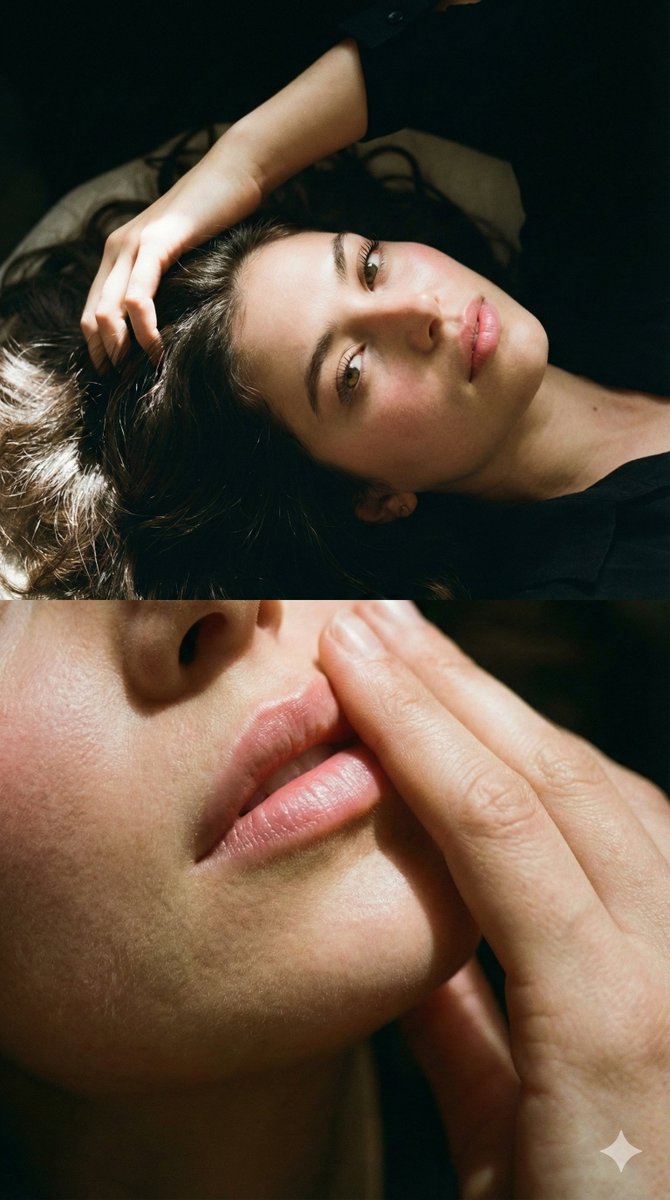
Recently, I experimented with an AI image prompt that completely transformed how I capture intimate portraiture. The idea was to create a two-part photo of myself, lying down with my face bathed in soft sunlight. The goal was to highlight every subtle detail—my smooth skin, natural flush, and the delicate textures of my hair and lips—without altering my facial features. Using the Google Nano Banana Pro on Gemini app, I was amazed at how closely the AI could mimic the natural glow and cinematic grain I envisioned.
You can find the full prompt here: ✨Prompt✨
Why This Prompt Worked for Me
What really stood out was the split composition. The top frame focused on my eyes, shot from above and to the side, capturing the long lashes and the relaxed pose of my hand resting on my hair. The way the sunlight gently illuminated my face brought out the smoothness of my skin and the subtle warmth of a natural flush. The bottom frame zoomed in on my lips, with my hand softly brushing over them, emphasizing a soft pink sheen that felt incredibly real.
The hair, long and straight with bright highlights, added texture and volume that popped against the dark, moody background. The cinematic grain effect gave the images a timeless film quality, making the overall effect feel both intimate and striking. This was not just about beauty—it was about authenticity and texture, something AI image generation often struggles to balance.
Insights and Tips for Your Own AI Portraits
- Lighting Matters: Soft, directional sunlight brings out skin texture and natural tones beautifully in AI-generated images.
- Split Composition: Breaking the image into two focused parts can create a compelling narrative and draw attention to details like eyes and lips.
- Keep Facial Features Untouched: Specifying not to alter facial features ensures the portrait remains authentic and personal.
- Cinematic Grain: Adding subtle grain effects can elevate digital images to feel more organic and timeless.
- Hair Texture: Highlighting hair with bright reflections adds depth and realism to portraits.
Exploring prompt adjustments like these helped me understand the delicate balance between hyper-realism and emotional warmth in AI portraiture. For fellow creators diving into AI art creator tools, I recommend experimenting with lighting and close-up framing to capture those nuanced details.
Final Thoughts
This prompt was a reminder of how AI image generation can be a powerful extension of personal storytelling. Instead of generic beauty shots, this approach brought out the uniqueness of my face and expression through subtle light and texture. If you’re curious about how to use prompt precision to create deeply personal visuals, this experience is a great place to start.
For more inspiration on crafting your own text to image prompts, check out the resources linked here and experiment with cinematic lighting and close-up details. The magic truly lies in the details.